You can partition a non-partitioned table in one of four ways:
A) Export/import method
B) Insert with a subquery method
C) Partition exchange method
D) DBMS_REDEFINITION
Either of these four methods will create a partitioned table from an existing non-partitioned table.
A. Export/import method
--------------------
1) Export your table:
exp pp/pp tables=numbers file=exp.dmp
2) Drop the table:
drop table numbers;
3) Recreate the table with partitions:
create table numbers (qty number(3), name varchar2(15))
partition by range (qty)
(partition p1 values less than (501),
partition p2 values less than (maxvalue));
4) Import the table with ignore=y:
imp pp/pp file=exp.dmp ignore=y
The ignore=y causes the import to skip the table creation and
continues to load all rows.
B. Insert with a subquery method
-----------------------------
1) Create a partitioned table:
create table partbl (qty number(3), name varchar2(15))
partition by range (qty)
(partition p1 values less than (501),
partition p2 values less than (maxvalue));
2) Insert into the partitioned table with a subquery from the
non-partitioned table:
insert into partbl (qty, name)
select * from origtbl;
3) If you want the partitioned table to have the same name as the
original table, then drop the original table and rename the
new table:
drop table origtbl;
alter table partbl rename to origtbl;
C. Partition Exchange method
-------------------------
ALTER TABLE EXCHANGE PARTITION can be used to convert a partition (or
subpartition) into a non-partitioned table and a non-partitioned table into a
partition (or subpartition) of a partitioned table by exchanging their data
and index segments.
1) Create table dummy_t as select with the required partitions
2) Alter table EXCHANGE partition partition_name
with table non-partition_table;
Example
-------
SQL> CREATE TABLE p_emp
2 (sal NUMBER(7,2))
3 PARTITION BY RANGE(sal)
4 (partition emp_p1 VALUES LESS THAN (2000),
5 partition emp_p2 VALUES LESS THAN (4000));
Table created.
SQL> SELECT * FROM emp;
EMPNO ENAME JOB MGR HIREDATE SAL
--------- ---------- --------- --------- --------- ---------
7369 SMITH CLERK 7902 17-DEC-80 800
7499 ALLEN SALESMAN 7698 20-FEB-81 1600
7521 WARD SALESMAN 7698 22-FEB-81 1250
7566 JONES MANAGER 7839 02-APR-81 2975
7654 MARTIN SALESMAN 7698 28-SEP-81 1250
7698 BLAKE MANAGER 7839 01-MAY-81 2850
7782 CLARK MANAGER 7839 09-JUN-81 2450
7788 SCOTT ANALYST 7566 19-APR-87 3000
7839 KING PRESIDENT 17-NOV-81 5000
7844 TURNER SALESMAN 7698 08-SEP-81 1500
7876 ADAMS CLERK 7788 23-MAY-87 1100
7900 JAMES CLERK 7698 03-DEC-81 950
7902 FORD ANALYST 7566 03-DEC-81 3000
7934 MILLER CLERK 7782 23-JAN-82 1300
14 rows selected.
SQL> CREATE TABLE dummy_y as SELECT sal
FROM emp WHERE sal<2000;
Table created.
SQL> CREATE TABLE dummy_z as SELECT sal FROM emp WHERE sal
BETWEEN 2000 AND 3999;
Table created.
SQL> alter table p_emp exchange partition emp_p1
with table dummy_y;
Table altered.
SQL> alter table p_emp exchange partition emp_p2
with table dummy_z;
Table altered.
D. DBMS_REDEFINITION
---------------------------------
Step by step instructions on how to convert unpartitioned table to partitioned one using dbms_redefinition package.
1) Create unpartitioned table with the name unpar_table
SQL> CREATE TABLE unpar_table (
id NUMBER(10),
create_date DATE,
name VARCHAR2(100)
);
2) Apply some constraints to the table:
SQL> ALTER TABLE unpar_table ADD (
CONSTRAINT unpar_table_pk PRIMARY KEY (id)
);
SQL> CREATE INDEX create_date_ind ON unpar_table(create_date);
3) Gather statistics on the table:
SQL> EXEC DBMS_STATS.gather_table_stats(USER, 'unpar_table', cascade => TRUE);
4) Create a Partitioned Interim Table:
SQL> CREATE TABLE par_table (
id NUMBER(10),
create_date DATE,
name VARCHAR2(100)
)
PARTITION BY RANGE (create_date)
(PARTITION unpar_table_2005 VALUES LESS THAN (TO_DATE('01/01/2005', 'DD/MM/YYYY')),
PARTITION unpar_table_2006 VALUES LESS THAN (TO_DATE('01/01/2006', 'DD/MM/YYYY')),
PARTITION unpar_table_2007 VALUES LESS THAN (MAXVALUE));
5) Start the Redefinition Process:
a) Check the redefinition is possible using the following command:
SQL> EXEC Dbms_Redefinition.can_redef_table(USER, 'unpar_table');
b)If no errors are reported, start the redefintion using the following command:
SQL> BEGIN
DBMS_REDEFINITION.start_redef_table(
uname => USER,
orig_table => 'unpar_table',
int_table => 'par_table');
END;
/
Note: This operation can take quite some time to complete.
c) Optionally synchronize new table with interim name before index creation:
SQL> BEGIN
dbms_redefinition.sync_interim_table(
uname => USER,
orig_table => 'unpar_table',
int_table => 'par_table');
END;
/
d) Create Constraints and Indexes:
SQL> ALTER TABLE par_table ADD (
CONSTRAINT unpar_table_pk2 PRIMARY KEY (id)
);
SQL> CREATE INDEX create_date_ind2 ON par_table(create_date);
e) Gather statistics on the new table:
SQL> EXEC DBMS_STATS.gather_table_stats(USER, 'par_table', cascade => TRUE);
f) Complete the Redefintion Process:
SQL> BEGIN
dbms_redefinition.finish_redef_table(
uname => USER,
orig_table => 'unpar_table',
int_table => 'par_table');
END;
/
At this point the interim table has become the "real" table and their names have been switched in the name dictionary.
g) Remove original table which now has the name of the interim table:
SQL> DROP TABLE par_table;
h)Rename all the constraints and indexes to match the original names.
ALTER TABLE unpar_table RENAME CONSTRAINT unpar_table_pk2 TO unpar_table_pk;
ALTER INDEX create_date_ind2 RENAME TO create_date_ind;
i) Check whether partitioning is successful or not:
SQL> SELECT partitioned
FROM user_tables
WHERE table_name = 'unpar_table';
PAR
---
YES
1 row selected.
SQL> SELECT partition_name
FROM user_tab_partitions
WHERE table_name = 'unpar_table';
PARTITION_NAME
------------------------------
unpar_table_2005
unpar_table_2006
unpar_table_2007
Wednesday, October 27, 2010


Monday, October 25, 2010
Creating a transportable tablespace set from RMAN backupsets
Creating a transportable tablespace set from RMAN backupsets:
As of 10.2,we can create an transportable tablespace set from RMAN backupsets without any impact to the current live database. Further, it can be used as a work-around to the error ORA-29308 when trying to perform TSPITR against a LOB object.
The TRANSPORT TABLESPACE will result in the following steps, carried out automatically by RMAN:
1) create an auxiliary instance
- create an auxiliary init file
- startup the auxiliary instance in nomount mode
- restore the controlfile from the source to the auxiliary
- alter database mount
2) recover auxiliary instance
- restore system related tablespace (system, undo, sysaux)
- restore transportable set datafiles to the auxiliary destination
- switch datafile to point to auxiliary destination
- recover auxiliary instance apply archivelogs if necessary and removing them once completed
- alter database open resetlogs on the auxiliary instance
3) perform data pump auxiliary instance
- recovery set of tablespaces are placed in read-only mode
- data pump export invoked to generate set of transportable recovery set of tablespace
A sample TTS script (tts.rcv)
run {
transport tablespace "USERS"
Tablespace destination '/ora_backup/tts'
Auxiliary destination '/ora_backup/tts'
Datapump directory data_pump_dir
dump file 'tts_test.dmp'
Import script 'tts_test.imp'
Export log 'exp_tts_test.log'
UNTIL TIME "to_date('02 NOV 2007 14:37:00','DD MON YYYY hh24:mi:ss')";
}
At the source database
1) set ORACLE_SID to the source db, eg:
$ export ORACLE_SID=ORA1020
2) Ensure all directories exist at both the operating system level and the database. To confirm the datadump directory:
SQL> select * from dba_directories
where DIRECTORY_NAME = 'DATA_PUMP_DIR';
OWNER DIRECTORY_NAME DIRECTORY_PATH
---- ---------------------- ----------------------------------------
SYS DATA_PUMP_DIR /apps/oracle/product/10.2.0/rdbms/log/
3) Execute the tts command file:
$ rman target / catalog rman/rman@rcat cmdfile tts.rcv log tts.log
Now you have a complete set of script and transportable tablespace set to plug into the destination database.
At the destination database
1) Ensure that the data pump directory exists at the destination host
SQL> select * from dba_directories
where DIRECTORY_NAME = 'DATA_PUMP_DIR';
OWNER DIRECTORY_NAME DIRECTORY_PATH
---- ---------------------- ----------------------------------------
SYS DATA_PUMP_DIR /apps/oracle/product/10.2.0/rdbms/log/
2) Transfer the data pump export dump to data_pump_dir
3) Transfer all the datafiles from the "tablespace destination" to the destination host's transport_tablespace directory
4) Ensure that the tablespace to be imported does not already exist at the target database, otherwise drop it
SQL> select tablespace_name, status from dba_tablespaces;
5) Ensure that the owners of the objects in the tablespace exist in this database.If not , create the users.
6) Transfer the import script "tts_test.imp" to the destination host.
7) Run the tts_test.imp file:
a) Import the tablespaces:
$ impdp / directory=data_pump_dir dumpfile= 'tts_test.dmp' transport_datafiles= /ora_backup/tts/users01.dbf
b) Attach the datafiles:
$ sqlplus / as sysdbda
SQL> @tts_test.imp
The tablespace should now be plugged in and ready for use.
Note: For read only tablespaces, you should put them into read-write, then read only again. This is to avoid a known bug when backing up read-only tablespaces via RMAN.
Sample content of tts_test.imp
/*
The following command may be used to import the tablespaces.
Substitute values for and .
impdp directory= dumpfile= 'tts_test.dmp' transport_datafiles= /ora_backup/tts/users01.dbf
*/
--------------------------------------------------------------
-- Start of sample PL/SQL script for importing the tablespaces
--------------------------------------------------------------
-- creating directory objects
CREATE DIRECTORY STREAMS$DIROBJ$1 AS '/ora_backup/tts/';
/* PL/SQL Script to import the exported tablespaces */
DECLARE
-- the datafiles
tbs_files dbms_streams_tablespace_adm.file_set;
cvt_files dbms_streams_tablespace_adm.file_set;
-- the dumpfile to import
dump_file dbms_streams_tablespace_adm.file;
dp_job_name VARCHAR2(30) := NULL;
-- names of tablespaces that were imported
ts_names dbms_streams_tablespace_adm.tablespace_set;
BEGIN
-- dump file name and location
dump_file.file_name := 'tts_test.dmp';
dump_file.directory_object := 'data_pump_dir';
-- forming list of datafiles for import
tbs_files( 1).file_name := 'users01.dbf';
tbs_files( 1).directory_object := 'STREAMS$DIROBJ$1';
-- import tablespaces
dbms_streams_tablespace_adm.attach_tablespaces(
datapump_job_name => dp_job_name,
dump_file => dump_file,
tablespace_files => tbs_files,
converted_files => cvt_files,
tablespace_names => ts_names);
-- output names of imported tablespaces
IF ts_names IS NOT NULL AND ts_names.first IS NOT NULL THEN
FOR i IN ts_names.first .. ts_names.last LOOP
dbms_output.put_line('imported tablespace '|| ts_names(i));
END LOOP;
END IF;
END;
/
-- dropping directory objects
DROP DIRECTORY STREAMS$DIROBJ$1;
--------------------------------------------------------------
-- End of sample PL/SQL script
--------------------------------------------------------------
Conditions necessary for transporting tablespace:
Condition 1:
------------
To check whether a tablespace can be transported and whether a tablespace is self contained, run:
dbms_tts.transport_set_check
The dbms_tts package is owned by sys, so to execute as another user either create a synonym or precede the package with 'sys'. In addition, the user must have been granted the role execute_catalog_role.
To create a synonym:
create synonym dbms_tts for sys.dbms_tts;
Run the procedure with the tablespace names as
SQL> execute dbms_tts.transport_set_check('LAVA',TRUE);
Statement processed.
This is going to populate a table called transport_set_violations. This
table is owned by the user sys. To query the table, either precede the
tablename by 'sys.' or create a synonym:
create synonym transport_set_violations for sys.transport_set_violations;
Check the view for any possible violations.
SQL> select * from transport_set_violations;
VIOLATIONS
--------------------------------------------------------------------------------
Sys owned object CATEGORIES in tablespace LAVA not allowed in pluggable set
1 row selected.
As of 10.2,we can create an transportable tablespace set from RMAN backupsets without any impact to the current live database. Further, it can be used as a work-around to the error ORA-29308 when trying to perform TSPITR against a LOB object.
The TRANSPORT TABLESPACE will result in the following steps, carried out automatically by RMAN:
1) create an auxiliary instance
- create an auxiliary init file
- startup the auxiliary instance in nomount mode
- restore the controlfile from the source to the auxiliary
- alter database mount
2) recover auxiliary instance
- restore system related tablespace (system, undo, sysaux)
- restore transportable set datafiles to the auxiliary destination
- switch datafile to point to auxiliary destination
- recover auxiliary instance apply archivelogs if necessary and removing them once completed
- alter database open resetlogs on the auxiliary instance
3) perform data pump auxiliary instance
- recovery set of tablespaces are placed in read-only mode
- data pump export invoked to generate set of transportable recovery set of tablespace
A sample TTS script (tts.rcv)
run {
transport tablespace "USERS"
Tablespace destination '/ora_backup/tts'
Auxiliary destination '/ora_backup/tts'
Datapump directory data_pump_dir
dump file 'tts_test.dmp'
Import script 'tts_test.imp'
Export log 'exp_tts_test.log'
UNTIL TIME "to_date('02 NOV 2007 14:37:00','DD MON YYYY hh24:mi:ss')";
}
At the source database
1) set ORACLE_SID to the source db, eg:
$ export ORACLE_SID=ORA1020
2) Ensure all directories exist at both the operating system level and the database. To confirm the datadump directory:
SQL> select * from dba_directories
where DIRECTORY_NAME = 'DATA_PUMP_DIR';
OWNER DIRECTORY_NAME DIRECTORY_PATH
---- ---------------------- ----------------------------------------
SYS DATA_PUMP_DIR /apps/oracle/product/10.2.0/rdbms/log/
3) Execute the tts command file:
$ rman target / catalog rman/rman@rcat cmdfile tts.rcv log tts.log
Now you have a complete set of script and transportable tablespace set to plug into the destination database.
At the destination database
1) Ensure that the data pump directory exists at the destination host
SQL> select * from dba_directories
where DIRECTORY_NAME = 'DATA_PUMP_DIR';
OWNER DIRECTORY_NAME DIRECTORY_PATH
---- ---------------------- ----------------------------------------
SYS DATA_PUMP_DIR /apps/oracle/product/10.2.0/rdbms/log/
2) Transfer the data pump export dump to data_pump_dir
3) Transfer all the datafiles from the "tablespace destination" to the destination host's transport_tablespace directory
4) Ensure that the tablespace to be imported does not already exist at the target database, otherwise drop it
SQL> select tablespace_name, status from dba_tablespaces;
5) Ensure that the owners of the objects in the tablespace exist in this database.If not , create the users.
6) Transfer the import script "tts_test.imp" to the destination host.
7) Run the tts_test.imp file:
a) Import the tablespaces:
$ impdp / directory=data_pump_dir dumpfile= 'tts_test.dmp' transport_datafiles= /ora_backup/tts/users01.dbf
b) Attach the datafiles:
$ sqlplus / as sysdbda
SQL> @tts_test.imp
The tablespace should now be plugged in and ready for use.
Note: For read only tablespaces, you should put them into read-write, then read only again. This is to avoid a known bug when backing up read-only tablespaces via RMAN.
Sample content of tts_test.imp
/*
The following command may be used to import the tablespaces.
Substitute values for
impdp
*/
--------------------------------------------------------------
-- Start of sample PL/SQL script for importing the tablespaces
--------------------------------------------------------------
-- creating directory objects
CREATE DIRECTORY STREAMS$DIROBJ$1 AS '/ora_backup/tts/';
/* PL/SQL Script to import the exported tablespaces */
DECLARE
-- the datafiles
tbs_files dbms_streams_tablespace_adm.file_set;
cvt_files dbms_streams_tablespace_adm.file_set;
-- the dumpfile to import
dump_file dbms_streams_tablespace_adm.file;
dp_job_name VARCHAR2(30) := NULL;
-- names of tablespaces that were imported
ts_names dbms_streams_tablespace_adm.tablespace_set;
BEGIN
-- dump file name and location
dump_file.file_name := 'tts_test.dmp';
dump_file.directory_object := 'data_pump_dir';
-- forming list of datafiles for import
tbs_files( 1).file_name := 'users01.dbf';
tbs_files( 1).directory_object := 'STREAMS$DIROBJ$1';
-- import tablespaces
dbms_streams_tablespace_adm.attach_tablespaces(
datapump_job_name => dp_job_name,
dump_file => dump_file,
tablespace_files => tbs_files,
converted_files => cvt_files,
tablespace_names => ts_names);
-- output names of imported tablespaces
IF ts_names IS NOT NULL AND ts_names.first IS NOT NULL THEN
FOR i IN ts_names.first .. ts_names.last LOOP
dbms_output.put_line('imported tablespace '|| ts_names(i));
END LOOP;
END IF;
END;
/
-- dropping directory objects
DROP DIRECTORY STREAMS$DIROBJ$1;
--------------------------------------------------------------
-- End of sample PL/SQL script
--------------------------------------------------------------
Conditions necessary for transporting tablespace:
Condition 1:
------------
To check whether a tablespace can be transported and whether a tablespace is self contained, run:
dbms_tts.transport_set_check
The dbms_tts package is owned by sys, so to execute as another user either create a synonym or precede the package with 'sys'. In addition, the user must have been granted the role execute_catalog_role.
To create a synonym:
create synonym dbms_tts for sys.dbms_tts;
Run the procedure with the tablespace names as
SQL> execute dbms_tts.transport_set_check('LAVA',TRUE);
Statement processed.
This is going to populate a table called transport_set_violations. This
table is owned by the user sys. To query the table, either precede the
tablename by 'sys.' or create a synonym:
create synonym transport_set_violations for sys.transport_set_violations;
Check the view for any possible violations.
SQL> select * from transport_set_violations;
VIOLATIONS
--------------------------------------------------------------------------------
Sys owned object CATEGORIES in tablespace LAVA not allowed in pluggable set
1 row selected.
Oracle 11g crucial new features for DBA
Hi ,
Below are some of the crucial new features that should be known by DBA working on oracle 11g Databases:
Oracle Database 11.1 Top New Feature for DBAs : SUMMARY
=====================================
1) Automatic Diagnostic Repository [ADR]
2) Database Replay
3) Automatic Memory Tuning
4) Case sensitive password
5) Virtual columns and indexes
6) Interval Partition and System Partition
7) The Result Cache
8) ADDM RAC Enhancements
9) SQL Plan Management and SQL Plan Baselines
10) SQL Access Advisor & Partition Advisor
11) SQL Query Repair Advisor
12) SQL Performance Analyzer (SPA) New
13) DBMS_STATS Enhancements
14) The Result Cache
15) Total Recall (Flashback Data Archive)
Note: The above are only top new features, there are other features as well introduced in 11g which will be included subsequently
Oracle 11.1 Database DBA New Features with brief explanation
==========================================
# Database Capture/replay database workloads :
This allows the total database workload to be captured, transferred to a test database create from a backup or standby database, then replayed to test the affects of an upgrade or system change. Currently, these are working to a capture performance overhead of 5%, so this will capture real production workloads
# Automatic Memory Tuning:
Automatic PGA tuning was introduced in Oracle 9i. Automatic SGA tuning was already
introduced in Oracle 10g. But In 11g, all memory can be tuned automatically by setting one parameter. We can literally tell Oracle how much memory it has and it determines how much to use for PGA, SGA and OS Processes. Maximum and minimum thresholds can be set.
# Interval partitioning for tables :
Interval partitions are extensions to range partitioning. These provide automation for equi-sized range partitions. Partitions are created as metadata and only the start partition is made persistent. The additional segments are allocated as the data arrives. The additional partitions and local indexes are automatically created.
# Feature Based Patching:
All one-off patches will be classified as to which feature they affect. This allows you to easily identify which patches are necessary for the features you are using. EM will allow you to subscribe to a feature based patching service, so EM automatically scans for available patches for the features you are using
# RMAN UNDO bypass :
Rman backup can bypass undo. Undo tablespaces are getting huge, but contain lots of useless information. Now rman can bypass those types of tablespace. Great for exporting a tablespace from backup.
# Virtual columns/indexes :
User can create Virtual index on table. This Virtual index is not visible to optimizer, so it will
not affect performance, Developer can user HINT and see is Index is useful or not.Invisible
Indexesprevent premature use of newly created indexes
# New default audit settings :
Oracle database where general database auditing was "off" by default, logging is intended to be enabled by default with the Oracle Database 11g beta secure configuration. Notable performance improvements are planned to be introduced to reduce the performance degradation typically associated with auditing.
# Case sensitive password :
Passwords are expected to also become case sensitive This and other changes should result in better protection against password guessing scenarios. For
example, in addition to limiting the number of failed login attempts to 10 (default configuration in 10gR2), Oracle 11g beta’s planned default settings should expire passwords every 180 days, and limit to seven the number of times a user can login with an expired password before disabling access.
# Faster DML triggers : Create a disabled trigger; specify trigger firing order
# Fine grained access control for Utl_TCP:
in 10g all port are available, now it is controlled.
# Data Guard supports "Flashback Standby"
# New Trigger features
# Partitioning by logical object and automated partition creation.
# LOB's - New high-performance LOB features.
# New Oracle11g Advisors
# Enhanced Read only tables
# Table trigger firing order
# Enhanced Index rebuild online : - Online index build with NO pause to DML.
# No recompilation of dependent objects:- When
A) Columns added to tables
B) Procedures added to packages
# Improved optimizer statistics collection speed
# Online index build with NO pause to DML
# Read only table :-
alter table t read only
alter table t read write
Oracle 11g Database SQL/PL-SQL New Features
----------------------------------------------
> Fine Grained Dependency Tracking:
In 11g we track dependencies at the level of element within unit. so that these changes have no consequence
• Transparent performance improvement
•Unnecessary recompilation certainly consumes CPU
create table t(a number)
create view v as select a from t
alter table t add(Unheard_Of number)
select status from User_Objects where Object_Name = 'V'
- -----
VALID
No recompilation of dependent objects when Columns added to tables OR Procedures
added to packages
> Named and Mixed Notation from SQL:
select fun(P4=>10) from DUAL
In 10g not possible to call function in select statment by passing 4th parameter,
but in 11g it is possible
> PL/SQL "continue" keyword - It is same as we read in c/c++ loop
> Support for “super”: It is same "super" in Java.
> Powerfull Regular Expression:
Now we can access data between TAGS like data between tags .........
The new built-in REGEXP_COUNT returns the number of times the pattern is matched in the
input string.
> New table Data Type "simple_integer"
> SQL Performance Analyzer(SPA) :
It is same as Database replay except it not capture all transaction.The SQL Performance Analyzer (SPA) leverages existing Oracle Database 10g SQL tuning components. The SPA provides the ability to capture a specific SQL workload in a SQL Tuning Set, take a performance baseline before a major database or system change, make the desired change to the system, and then replay the SQL workload against the modified database or configuration. The before and after performance of the SQL workload can then be compared with just a few clicks of the mouse. The DBA only needs to isolate any SQL statements that are now performing poorly and tune them via the SQL Tuning Advisor
> Caching The Results with /*+ result_cache */ :
select /*+ result_cache */ * from my_table, New for Oracle 11g, the result_cache hint caches the result set of a select statement. This is similar to alter table table_name cache,but as you can adding predicates makes /*+ result_cache */ considerably more powerful by caching a subset of larger tables and common queries.
select /*+ result_cache */ col1, col2, col3 from my_table where colA = :B1
> The compound trigger :
A compound trigger lets you implement actions for each of the table DML timing points in a single trigger
> PL/SQL unit source can exceeds 32k characters
> Easier to execute table DDL operations online:
Option to wait for active DML operations instead of aborting
> Fast add column with default value:
Does not need to update all rows to default value.
Oracle 11g Database Backup & Recovery New Features
------------------------------------------------
* Enhanced configuration of archive deletion policies Archive can be deleted , if it is not need DG , Streams Flashback etc When you CONFIGURE an archived log deletion policy applies to all archiving destinations, including the flash recovery area. BACKUP ... DELETE
INPUT and DELETE... ARCHIVELOG use this configuration, as does the flash recovery area.
When we back up the recovery area, RMAN can fail over to other archived redo log
destinations if the flash recovery area is inaccessible.
* Configuring backup compression:
In 11g can use CONFIGURE command to choose between the BZIP2 and ZLIB compression
algorithms for RMAN backups.
* Active Database Duplication:
Now DUPLICATE command is network aware i.e.we can create a duplicate or standby
database over the network without taking backup or using old backup.
* Parallel backup and restore for very large files:
RMAN Backups of large data files now use multiple parallel server processes to efficiently
distribute theworkload for each file. This features improves the performance of backups.
* Improved block media recovery performance:
RECOVER command can recover individual data blocks.
RMAN take older, uncorrupted blocks from flashback and the RMAN can use these blocks,
thereby speeding up block media recovery.
* Fast incremental backups on physical standby database:
11g has included new feature of enable block change tracking on a physical standby
database (ALTER DATABASE ENABLE/DISABLE BLOCK CHANGE TRACKING SQL statement).
This new 11g feature enables faster incremental backups on a physical standby database
than in previous releases.because RMAN identifywe the changed blocks sincethe last
incremental backup.
11g ASM New Features
-----------------------
The new features in Automatic Storage Management (ASM) extend the storage
management automation, improve scalability, and further simplify management for
Oracle Database files.
■ ASM Fast Mirror Resync
A new SQL statement, ALTER DISKGROUP ... DISK ONLINE, can be executed
after a failed disk has been repaired. The command first brings the disk online for writes so that no new writes are missed. Subsequently, it initiates a copy of all extents marked as stale on a disk from their redundant copies.
This feature significantly reduces the time it takes to repair a failed diskgroup,potentially from hours to minutes. The repair time is proportional to the number of extents that have been written to or modified since the failure.
■ ASM Manageability Enhancements
The new storage administration features for ASM manageability include the following:
■ New attributes for disk group compatibility
To enable some of the new ASM features, you can use two new disk group
compatibility attributes, compatible.rdbms and compatible.asm. These
attributes specify the minimum software version that is required to use disk
groups for the database and for ASM, respectively. This feature enables
heterogeneous environments with disk groups from both Oracle Database 10g and
Oracle Database 11g. By default, both attributes are set to 10.1. You must advance
these attributes to take advantage of the new features.
■ New ASM command-line utility (ASMCMD) commands and options
ASMCMD allows ASM disk identification, disk bad block repair, and backup and
restore operations in your ASM environment for faster recovery.
■ ASM fast rebalance
Rebalance operations that occur while a disk group is in RESTRICTED mode
eliminate the lock and unlock extent map messaging between ASM instances in
Oracle RAC environments, thus improving overall rebalance throughput.
This collection of ASM management features simplifies and automates storage
management for Oracle databases.
■ ASM Preferred Mirror Read
When ASM failure groups are defined, ASM can now read from the extent that is
closest to it, rather than always reading the primary copy. A new initialization parameter, ASM_PREFERRED_READ_FAILURE_GROUPS, lets the ASM administrator specify a list of failure group names that contain the preferred read disks for each node in a cluster.
In an extended cluster configuration, reading from a local copy provides a great
performance advantage. Every node can read from its local diskgroup (failure group),
resulting in higher efficiency and performance and reduced network traffic.
■ ASM Rolling Upgrade
Rolling upgrade is the ability of clustered software to function when one or more of the nodes in the cluster are at different software versions. The various versions of the software can still communicate with each other and provide a single system image.
The rolling upgrade capability will be available when upgrading from Oracle
Database 11g Release 1 (11.1).
This feature allows independent nodes of an ASM cluster to be migrated or patched without affecting the availability of the database. Rolling upgrade provides higher uptime and graceful migration to new releases.
■ ASM Scalability and Performance Enhancements
This feature increases the maximum data file size that Oracle can support to 128 TB.
ASM supports file sizes greater than 128 TB in any redundancy mode. This provides
near unlimited capacity for future growth. The ASM file size limits are:
■ External redundancy - 140 PB
■ Normal redundancy - 42 PB
■ High redundancy - 15 PB
Customers can also increase the allocation unit size for a disk group in powers of 2 up to 64 MB.
■ Convert Single-Instance ASM to Clustered ASM
This feature provides support within Enterprise Manager to convert a non-clustered
ASM database to a clustered ASM database by implicitly configuring ASM on all
nodes. It also extends the single-instance to Oracle RAC conversion utility to support standby databases.
Simplifying the conversion makes it easier for customers to migrate their databases and achieve the benefits of scalability and high availability provided by Oracle RAC.
■ New SYSASM Privilege for ASM Administration
This feature introduces the new SYSASM privilege to allow for separation of database management and storage management responsibilities.
The SYSASM privilege allows an administrator to manage the disk groups that can be shared by multiple databases. The SYSASM privilege provides a clear separation of
duties from the SYSDBA privilege.
Best regards,
Rafi.
Below are some of the crucial new features that should be known by DBA working on oracle 11g Databases:
Oracle Database 11.1 Top New Feature for DBAs : SUMMARY
=====================================
1) Automatic Diagnostic Repository [ADR]
2) Database Replay
3) Automatic Memory Tuning
4) Case sensitive password
5) Virtual columns and indexes
6) Interval Partition and System Partition
7) The Result Cache
8) ADDM RAC Enhancements
9) SQL Plan Management and SQL Plan Baselines
10) SQL Access Advisor & Partition Advisor
11) SQL Query Repair Advisor
12) SQL Performance Analyzer (SPA) New
13) DBMS_STATS Enhancements
14) The Result Cache
15) Total Recall (Flashback Data Archive)
Note: The above are only top new features, there are other features as well introduced in 11g which will be included subsequently
Oracle 11.1 Database DBA New Features with brief explanation
==========================================
# Database Capture/replay database workloads :
This allows the total database workload to be captured, transferred to a test database create from a backup or standby database, then replayed to test the affects of an upgrade or system change. Currently, these are working to a capture performance overhead of 5%, so this will capture real production workloads
# Automatic Memory Tuning:
Automatic PGA tuning was introduced in Oracle 9i. Automatic SGA tuning was already
introduced in Oracle 10g. But In 11g, all memory can be tuned automatically by setting one parameter. We can literally tell Oracle how much memory it has and it determines how much to use for PGA, SGA and OS Processes. Maximum and minimum thresholds can be set.
# Interval partitioning for tables :
Interval partitions are extensions to range partitioning. These provide automation for equi-sized range partitions. Partitions are created as metadata and only the start partition is made persistent. The additional segments are allocated as the data arrives. The additional partitions and local indexes are automatically created.
# Feature Based Patching:
All one-off patches will be classified as to which feature they affect. This allows you to easily identify which patches are necessary for the features you are using. EM will allow you to subscribe to a feature based patching service, so EM automatically scans for available patches for the features you are using
# RMAN UNDO bypass :
Rman backup can bypass undo. Undo tablespaces are getting huge, but contain lots of useless information. Now rman can bypass those types of tablespace. Great for exporting a tablespace from backup.
# Virtual columns/indexes :
User can create Virtual index on table. This Virtual index is not visible to optimizer, so it will
not affect performance, Developer can user HINT and see is Index is useful or not.Invisible
Indexesprevent premature use of newly created indexes
# New default audit settings :
Oracle database where general database auditing was "off" by default, logging is intended to be enabled by default with the Oracle Database 11g beta secure configuration. Notable performance improvements are planned to be introduced to reduce the performance degradation typically associated with auditing.
# Case sensitive password :
Passwords are expected to also become case sensitive This and other changes should result in better protection against password guessing scenarios. For
example, in addition to limiting the number of failed login attempts to 10 (default configuration in 10gR2), Oracle 11g beta’s planned default settings should expire passwords every 180 days, and limit to seven the number of times a user can login with an expired password before disabling access.
# Faster DML triggers : Create a disabled trigger; specify trigger firing order
# Fine grained access control for Utl_TCP:
in 10g all port are available, now it is controlled.
# Data Guard supports "Flashback Standby"
# New Trigger features
# Partitioning by logical object and automated partition creation.
# LOB's - New high-performance LOB features.
# New Oracle11g Advisors
# Enhanced Read only tables
# Table trigger firing order
# Enhanced Index rebuild online : - Online index build with NO pause to DML.
# No recompilation of dependent objects:- When
A) Columns added to tables
B) Procedures added to packages
# Improved optimizer statistics collection speed
# Online index build with NO pause to DML
# Read only table :-
alter table t read only
alter table t read write
Oracle 11g Database SQL/PL-SQL New Features
----------------------------------------------
> Fine Grained Dependency Tracking:
In 11g we track dependencies at the level of element within unit. so that these changes have no consequence
• Transparent performance improvement
•Unnecessary recompilation certainly consumes CPU
create table t(a number)
create view v as select a from t
alter table t add(Unheard_Of number)
select status from User_Objects where Object_Name = 'V'
- -----
VALID
No recompilation of dependent objects when Columns added to tables OR Procedures
added to packages
> Named and Mixed Notation from SQL:
select fun(P4=>10) from DUAL
In 10g not possible to call function in select statment by passing 4th parameter,
but in 11g it is possible
> PL/SQL "continue" keyword - It is same as we read in c/c++ loop
> Support for “super”: It is same "super" in Java.
> Powerfull Regular Expression:
Now we can access data between TAGS like data between tags
The new built-in REGEXP_COUNT returns the number of times the pattern is matched in the
input string.
> New table Data Type "simple_integer"
> SQL Performance Analyzer(SPA) :
It is same as Database replay except it not capture all transaction.The SQL Performance Analyzer (SPA) leverages existing Oracle Database 10g SQL tuning components. The SPA provides the ability to capture a specific SQL workload in a SQL Tuning Set, take a performance baseline before a major database or system change, make the desired change to the system, and then replay the SQL workload against the modified database or configuration. The before and after performance of the SQL workload can then be compared with just a few clicks of the mouse. The DBA only needs to isolate any SQL statements that are now performing poorly and tune them via the SQL Tuning Advisor
> Caching The Results with /*+ result_cache */ :
select /*+ result_cache */ * from my_table, New for Oracle 11g, the result_cache hint caches the result set of a select statement. This is similar to alter table table_name cache,but as you can adding predicates makes /*+ result_cache */ considerably more powerful by caching a subset of larger tables and common queries.
select /*+ result_cache */ col1, col2, col3 from my_table where colA = :B1
> The compound trigger :
A compound trigger lets you implement actions for each of the table DML timing points in a single trigger
> PL/SQL unit source can exceeds 32k characters
> Easier to execute table DDL operations online:
Option to wait for active DML operations instead of aborting
> Fast add column with default value:
Does not need to update all rows to default value.
Oracle 11g Database Backup & Recovery New Features
------------------------------------------------
* Enhanced configuration of archive deletion policies Archive can be deleted , if it is not need DG , Streams Flashback etc When you CONFIGURE an archived log deletion policy applies to all archiving destinations, including the flash recovery area. BACKUP ... DELETE
INPUT and DELETE... ARCHIVELOG use this configuration, as does the flash recovery area.
When we back up the recovery area, RMAN can fail over to other archived redo log
destinations if the flash recovery area is inaccessible.
* Configuring backup compression:
In 11g can use CONFIGURE command to choose between the BZIP2 and ZLIB compression
algorithms for RMAN backups.
* Active Database Duplication:
Now DUPLICATE command is network aware i.e.we can create a duplicate or standby
database over the network without taking backup or using old backup.
* Parallel backup and restore for very large files:
RMAN Backups of large data files now use multiple parallel server processes to efficiently
distribute theworkload for each file. This features improves the performance of backups.
* Improved block media recovery performance:
RECOVER command can recover individual data blocks.
RMAN take older, uncorrupted blocks from flashback and the RMAN can use these blocks,
thereby speeding up block media recovery.
* Fast incremental backups on physical standby database:
11g has included new feature of enable block change tracking on a physical standby
database (ALTER DATABASE ENABLE/DISABLE BLOCK CHANGE TRACKING SQL statement).
This new 11g feature enables faster incremental backups on a physical standby database
than in previous releases.because RMAN identifywe the changed blocks sincethe last
incremental backup.
11g ASM New Features
-----------------------
The new features in Automatic Storage Management (ASM) extend the storage
management automation, improve scalability, and further simplify management for
Oracle Database files.
■ ASM Fast Mirror Resync
A new SQL statement, ALTER DISKGROUP ... DISK ONLINE, can be executed
after a failed disk has been repaired. The command first brings the disk online for writes so that no new writes are missed. Subsequently, it initiates a copy of all extents marked as stale on a disk from their redundant copies.
This feature significantly reduces the time it takes to repair a failed diskgroup,potentially from hours to minutes. The repair time is proportional to the number of extents that have been written to or modified since the failure.
■ ASM Manageability Enhancements
The new storage administration features for ASM manageability include the following:
■ New attributes for disk group compatibility
To enable some of the new ASM features, you can use two new disk group
compatibility attributes, compatible.rdbms and compatible.asm. These
attributes specify the minimum software version that is required to use disk
groups for the database and for ASM, respectively. This feature enables
heterogeneous environments with disk groups from both Oracle Database 10g and
Oracle Database 11g. By default, both attributes are set to 10.1. You must advance
these attributes to take advantage of the new features.
■ New ASM command-line utility (ASMCMD) commands and options
ASMCMD allows ASM disk identification, disk bad block repair, and backup and
restore operations in your ASM environment for faster recovery.
■ ASM fast rebalance
Rebalance operations that occur while a disk group is in RESTRICTED mode
eliminate the lock and unlock extent map messaging between ASM instances in
Oracle RAC environments, thus improving overall rebalance throughput.
This collection of ASM management features simplifies and automates storage
management for Oracle databases.
■ ASM Preferred Mirror Read
When ASM failure groups are defined, ASM can now read from the extent that is
closest to it, rather than always reading the primary copy. A new initialization parameter, ASM_PREFERRED_READ_FAILURE_GROUPS, lets the ASM administrator specify a list of failure group names that contain the preferred read disks for each node in a cluster.
In an extended cluster configuration, reading from a local copy provides a great
performance advantage. Every node can read from its local diskgroup (failure group),
resulting in higher efficiency and performance and reduced network traffic.
■ ASM Rolling Upgrade
Rolling upgrade is the ability of clustered software to function when one or more of the nodes in the cluster are at different software versions. The various versions of the software can still communicate with each other and provide a single system image.
The rolling upgrade capability will be available when upgrading from Oracle
Database 11g Release 1 (11.1).
This feature allows independent nodes of an ASM cluster to be migrated or patched without affecting the availability of the database. Rolling upgrade provides higher uptime and graceful migration to new releases.
■ ASM Scalability and Performance Enhancements
This feature increases the maximum data file size that Oracle can support to 128 TB.
ASM supports file sizes greater than 128 TB in any redundancy mode. This provides
near unlimited capacity for future growth. The ASM file size limits are:
■ External redundancy - 140 PB
■ Normal redundancy - 42 PB
■ High redundancy - 15 PB
Customers can also increase the allocation unit size for a disk group in powers of 2 up to 64 MB.
■ Convert Single-Instance ASM to Clustered ASM
This feature provides support within Enterprise Manager to convert a non-clustered
ASM database to a clustered ASM database by implicitly configuring ASM on all
nodes. It also extends the single-instance to Oracle RAC conversion utility to support standby databases.
Simplifying the conversion makes it easier for customers to migrate their databases and achieve the benefits of scalability and high availability provided by Oracle RAC.
■ New SYSASM Privilege for ASM Administration
This feature introduces the new SYSASM privilege to allow for separation of database management and storage management responsibilities.
The SYSASM privilege allows an administrator to manage the disk groups that can be shared by multiple databases. The SYSASM privilege provides a clear separation of
duties from the SYSDBA privilege.
Best regards,
Rafi.
Monday, October 11, 2010
RAC CERTIFICATION PREPARATION
Hi,
RAC Certification preparation should be done devotedly,since I believe It is one of the toughest exam to get through because of the below reasons:
1)Two exams we have to pass,If we pass in one than also you are considered fail.
2)Practise on RAC installation which cannot be done frequently in your work place.
3)Netwoking issues can test your patience while doing RAC installation.
I passed my RAC Certification by following below tips:
1)Do installation of RAC in group so that you can discuss the issues and resolve them as soon as possible.
2)Practise RAC commands like srvctl,crsctl,crsstat,cluvfy as much as possible
3)Understand the concept and functioning of each concept like Cache fusion,Cache coherency...
4)Discuss various RAC errors and search for the solution on the net.
Books you can follow:
1)Oracle Instructor led training Book of Oracle 10g RAC volume1 and volume2
2)Oracle Press books
3)Oracle 10g RAC by JAFFAR sir.
Links you can follow:
1)ORACLE BASE
2)TAHITI.COM(ORACLE OFFICIAL DOCUMENTATION)
3)ORACLE FORUM
Hope it helps.
Best regards,
Rafi.
RAC Certification preparation should be done devotedly,since I believe It is one of the toughest exam to get through because of the below reasons:
1)Two exams we have to pass,If we pass in one than also you are considered fail.
2)Practise on RAC installation which cannot be done frequently in your work place.
3)Netwoking issues can test your patience while doing RAC installation.
I passed my RAC Certification by following below tips:
1)Do installation of RAC in group so that you can discuss the issues and resolve them as soon as possible.
2)Practise RAC commands like srvctl,crsctl,crsstat,cluvfy as much as possible
3)Understand the concept and functioning of each concept like Cache fusion,Cache coherency...
4)Discuss various RAC errors and search for the solution on the net.
Books you can follow:
1)Oracle Instructor led training Book of Oracle 10g RAC volume1 and volume2
2)Oracle Press books
3)Oracle 10g RAC by JAFFAR sir.
Links you can follow:
1)ORACLE BASE
2)TAHITI.COM(ORACLE OFFICIAL DOCUMENTATION)
3)ORACLE FORUM
Hope it helps.
Best regards,
Rafi.
Interview questions from ORACLE OD
Hi,
Below are some of the interview questions of ORACLE OD:
1)Describe oracle 9i Architecture?
Ans: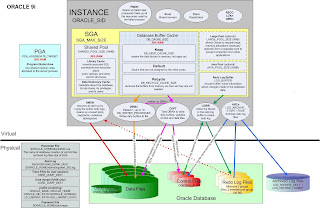
This is one of the basic question asked in interview.To explain in brief,oracle 9i Server consist of
1)ORACLE INSTANCE &
2)ORACLE DATABASE
1)ORACLE INSTANCE:Oracle Instance consists of SGA and group of mandatory back ground processes like SMON,PMON,DBWR,LGWR & CKPT
SGA:SGA Consist of Shared pool which in turn consists of library cache and Data Dictionary cache.In the Library cache recently executed SQL,PL/SQL statements are stored.Dictionary cache is used to give privileges to the users or roles.
Database buffer cache:The database buffer cache is a portion of the System Global Area (SGA) , which is responsible for caching the frequently accessed blocks of a segment. The subsequent transactions requiring the same blocks can then access them from memory, instead of from the hard disk. The database buffer cache works on the basis of the least recently used (LRU) algorithm, according to which the most frequently accessed blocks are retained in memory while the less frequent ones are phased out.
Redolog Buffer cache:A log buffer is a circular buffer in the SGA that holds information about changes made to the database. This information is stored in the redo entries. Redo entries contain the information necessary to reconstruct or redo changes made to the database by insert, update, delete, create, alter, or drop operations. Redo entries are primarily used for database recovery as necessary.
The server processes generate redo data into the log buffer as they make changes to the data blocks in the buffer. LGWR subsequently writes entries from the redo log buffer to the online redo log.
Program Global Area (PGA)
A Program Global Area (PGA) is a memory region that contains data and control information for a server process. It is a non-shared memory region created by Oracle when a server process is started. Access to the PGA is exclusive to that server process and it is read and written only by Oracle code acting on its behalf. It contains a private SQL area and a session memory area
JAVA Pool:The JAVA Pool holds the JAVA execution code,used by export/import activities.
LARGE POOL:
Oracle Large Pool is an optional memory component of the oracle database SGA. This area is used for providing large memory allocations in many situations that arise during the operations of an oracle database instance.
1. Session memory for the a shared server and the Oracle XA Interface when distributed transactions are involved
2. I/O Server Processes
3. Parallel Query Buffers
4. Oracle Backup and Restore Operations using RMAN
Large Pool plays an important role in Oracle Database Tuning since the allocation of the memory for the above components otherwise is done from the shared pool. Also due to the large memory requirements for I/O and Rman operations, the large pool is better able to satisfy the requirements instead of depending on the Shared Pool Area.
Usage of a Large Pool Area allows the shared pool to primarily cache SQL and avoid the overhead
UGA:The User Global Area (UGA) is a memory area (RAM) that holds session-based information.
UGA comes in to picture only in case of Shared server connection because of the below reasons:
Dedicated Server :
When running in Dedicated Server mode (one session = one dedicated process), the UGA is stored in the PGA (process global area).
Shared Server:
When running in Shared Server mode (MTS(Multi-threaded server)) with shared servers and dispatchers), sessions can be served by multiple server processes. As a result, the UGA cannot be stored in the PGA, and is moved to the SGA (shared global area).
Mandatory Background process and their short descriptions are as follows:
-------------------------------------------------------------------------
1)SMON:The System Monitor process performs instance recovery when a failed instance starts up again.
2)PMON:The Process Monitor process performs process recovery when a user process fails . PMON is responsible for cleaning up the cache and freeing resources that the failed process was using and for checking on the dispatcher and server processes and restarting them if they have failed.
3)DBWR:Database Writer writes all modified blocks from the database buffer cache out to the proper datafiles.
4)LGWR:The Log Writer process writes redo log entries from the redo log buffer out to the online redo logs on disk. If your database has multiplexed redo logs, log writer writes the redo log entries to the entire group of online redo log files and commits only when all the redo has been written to disk.
5)CKPT:The checkpoint ensures that the checkpoint number is written into the datafile headers and along with the log sequence number, archive log names (if the database is in archive log mode), and the system change numbers is written into the control file.
i.e The checkpoint process is responsible for syncronization of the Datafiles and control file with the same SCN number.
Note:CKPT does not write blocks to disk; DBWn always performs this task. CKPT triggers DBWR to write the blocks out to their respective files.
Archiver (ARCn)
Archiver (an optional process) copies the online redo log files to archival storage after a log switch has occurred for databases running in archive log mode. Although a single archiver process (ARC0) is usually sufficient for most systems, you can specify up to 10 ARCn processes by using the dynamic initialization parameter LOG_ARCHIVE_MAX_PROCESSES. If the archiving workload gets to be too much for the current number of archiver processes, log writer automatically starts another archiver process up to the maximum of 10 processes. ARCn is active only when a database is in ARCHIVELOG mode and automatic archiving is enabled.
Recoverer (RECO)
The Recoverer (an optional process) is used to resolve any distributed transactions left pending due to a network or system failure in a distributed database. At timed intervals, the local RECO attempts to connect to the associated remote databases and, if it is successful, automatically complete the commit or rollback of the local portions of any pending distributed transactions
Physical structure of the Database:
physical components of oracle database are control files redo log files and datafiles.
1)Datafiles:Datafiles are the physical files which stores data of all logical structure.
2)Control file: control file is read in the mount state of database. control file is a small binary file which records the physical structure of database which includes
*database name
*names and locations of datafiles and online redo log files.
*timestamp of database creation
*check point information
*current log sequence number.
3)Redo log files: Redo log files saves all the changes that are made to the database as they occur. This plays a great role in the database recovery.
2)How to check concurrent manager is up & running ?
Ans: One way to see if a concurrent manager is up & running is to use the 'Administer concurrent Managers' form.
Navigate to Concurrent->Managers->Administer.You will see two columns labeled 'Actual' and 'Target'.The Target column lists the number of processes that should be running for each manager for this particular workshift.The Actual column lists the number of processes that are actually running.If the Actual column is zero,there are no processes running for this manager.If the Target column is zero,then either a workshift does not specify any target processes.If the target column is not zero,then the manager processes have either failed to start up,or gone down.We should check the manager's logfile and the ICM(Internal concurrent manager) logfile.
Note:It is possible for the form to be inaccurate,i.e it may show actual processes even thought they are not really running.So check the below command.
(OR)
In Unix environment:We can also check for OS processes using the 'ps' command.
$ps -ef|grep FNDLIBR
In windows environment:We can check to see if the concurrent manager services is running using the service control panel.
3)How to check the Apache or Http server is up and running?
Ans: We can use the below command:
$ps -ef|grep httpd
4)What is resumable space allocation?
Ans: Resumable Space Allocation
Long running operations such as imports and batch processes sometimes fail because the server is unable to allocate more extents for an object. This may be because the object has reached max_extents or there isn't sufficient room in the tablespace for the object to expand. In previous releases the operation would have to be rerun, possible with some manual cleanup necessary. In Oracle9i operations that would fail due to space allocation problems can be suspended and restarted once the problem is fixed.
It can be enabled or disabled as follows:
ALTER SESSION ENABLE RESUMABLE;
ALTER SESSION DISABLE RESUMABLE;
5)How to create password file in oracle & List the options used to create the password file?
Ans: We can create a password file using the password file creation utility,ORAPWD .
Eg:orapwd FILE=orapworcl ENTRIES=30
Where:
FILE :Name to assign to the password file.We must specify the full path name for the file.
ENTRIES
This argument specifies the number of entries that you require the password file to accept. This number corresponds to the number of distinct users allowed to connect to the database as SYSDBA or SYSOPER. The actual number of allowable entries can be higher than the number of users, because the ORAPWD utility continues to assign password entries until an operating system block is filled. For example, if your operating system block size is 512 bytes, it holds four password entries. The number of password entries allocated is always a multiple of four.
Entries can be reused as users are added to and removed from the password file. If you intend to specify REMOTE_LOGIN_PASSWORDFILE=EXCLUSIVE, and to allow the granting of SYSDBA and SYSOPER privileges to users, this argument is required.
FORCE
This argument, if set to Y, enables you to overwrite an existing password file. An error is returned if a password file of the same name already exists and this argument is omitted or set to N.
IGNORECASE
If this argument is set to y, passwords are case-insensitive. That is, case is ignored when comparing the password that the user supplies during login with the password in the password file.
6)What is conflict Resolution Manager in oracle Application?Ans: Concurrent Managers read requests to start concurrent programs running.The conflict Resolution Manager checks concurrent program definitions for incompatibility rules.
If a program is identified as Run Alone,then the Conflict Resolution Manager prevents the concurrent manager from starting other programs in the same conflict domain.
when a program lists other programs as being incompatible with it,the conflict Resolution Manager prevents the program from starting until any incompatible
programs in the same domain have completed running.
7)How to check the process consuming more cpu & what action you will take on this?
Ans: At the OS level we can use the below commands:
sar & top to get CPU utilization details.
sar -u 2 5
-u=>user level
Report CPU utilization for each 2 seconds. 5 lines are displayed.
(OR)
$top -c
Database level:
------------------
The join query involving mainly v$process,v$session can also be used to get CPU and I/O consumption of the users:
Users and Sessions CPU and I/O consumption can be obtained by below query:
-- shows Day wise,User wise,Process id of server wise- CPU and I/O consumption
set linesize 140
col spid for a6
col program for a35 trunc
select p.spid SPID,to_char(s.LOGON_TIME,'DDMonYY HH24:MI') date_login,s.username,decode(nvl(p.background,0),1,bg.description, s.program ) program,
ss.value/100 CPU,physical_reads disk_io,(trunc(sysdate,'J')-trunc(logon_time,'J')) days,
round((ss.value/100)/(decode((trunc(sysdate,'J')-trunc(logon_time,'J')),0,1,(trunc(sysdate,'J')-trunc(logon_time,'J')))),2) cpu_per_day
from V$PROCESS p,V$SESSION s,V$SESSTAT ss,V$SESS_IO si,V$BGPROCESS bg
where s.paddr=p.addr and ss.sid=s.sid
and ss.statistic#=12 and si.sid=s.sid
and bg.paddr(+)=p.addr
and round((ss.value/100),0) > 10
order by 8;
8)What will be the state of Database when the current online redolog gets corrupted?
Ans: Database should be up and running.
If the CURRENT redo log is lost and if the DB is closed consistently, OPEN RESETLOGS can be issued directly without any transaction loss.
SQL>Alter Database open resetlogs;
For more such scenarios check the below link:
http://drdatabase.wordpress.com/2009/03/13/missing-redo-logs-scenario/
9))What will happen to Database when any of the mandatory Background process gets killed?
Ans: Instance should get crashed.
10)What is ORA-60 error?
Ans: ORA-60 is the Deadlock error.We can see this error in the alert log file of the Database.For more detail regarding this error check the alert log file which will tell you the trace file location which is usually present in UDUMP Directory(User related error and trace file Directory location).We can check this trace file to see which session is blocking which session and we can also get the exact SQL statement which is causing the deadlock from this trace file.Usually Deadlocks are detected and resolved automatically by oracle.In most of the cases I Found Deadlock happens due to Application designing issue.In order to prevent them happening next time we need to change the Application design which is causing deadlock.
11)How often you take production Database backup?What kind of Backup do you take?
Ans: We have to be very careful when answering Backup strategy related questions usually we don't shut down or bounce our production Database daily,production database is bounced weekly once to take cold backup.But we take hot backup/online backup monday to Saturday after export backup.Cold backup is done only on sundays after doing logical export backup in my current organization.
Backup strategy we follow for production Database is as follows:
1)Full export at 3 am followed by cold backup on sunday.
2)Full export at 6 am followed by online backup on monday-saturday.
We usually take hot and cold backup for our production Database.
Hope these questions help in interview preparation and interview clearance.
Best regards,
Rafi.
Below are some of the interview questions of ORACLE OD:
1)Describe oracle 9i Architecture?
Ans:

This is one of the basic question asked in interview.To explain in brief,oracle 9i Server consist of
1)ORACLE INSTANCE &
2)ORACLE DATABASE
1)ORACLE INSTANCE:Oracle Instance consists of SGA and group of mandatory back ground processes like SMON,PMON,DBWR,LGWR & CKPT
SGA:SGA Consist of Shared pool which in turn consists of library cache and Data Dictionary cache.In the Library cache recently executed SQL,PL/SQL statements are stored.Dictionary cache is used to give privileges to the users or roles.
Database buffer cache:The database buffer cache is a portion of the System Global Area (SGA) , which is responsible for caching the frequently accessed blocks of a segment. The subsequent transactions requiring the same blocks can then access them from memory, instead of from the hard disk. The database buffer cache works on the basis of the least recently used (LRU) algorithm, according to which the most frequently accessed blocks are retained in memory while the less frequent ones are phased out.
Redolog Buffer cache:A log buffer is a circular buffer in the SGA that holds information about changes made to the database. This information is stored in the redo entries. Redo entries contain the information necessary to reconstruct or redo changes made to the database by insert, update, delete, create, alter, or drop operations. Redo entries are primarily used for database recovery as necessary.
The server processes generate redo data into the log buffer as they make changes to the data blocks in the buffer. LGWR subsequently writes entries from the redo log buffer to the online redo log.
Program Global Area (PGA)
A Program Global Area (PGA) is a memory region that contains data and control information for a server process. It is a non-shared memory region created by Oracle when a server process is started. Access to the PGA is exclusive to that server process and it is read and written only by Oracle code acting on its behalf. It contains a private SQL area and a session memory area
JAVA Pool:The JAVA Pool holds the JAVA execution code,used by export/import activities.
LARGE POOL:
Oracle Large Pool is an optional memory component of the oracle database SGA. This area is used for providing large memory allocations in many situations that arise during the operations of an oracle database instance.
1. Session memory for the a shared server and the Oracle XA Interface when distributed transactions are involved
2. I/O Server Processes
3. Parallel Query Buffers
4. Oracle Backup and Restore Operations using RMAN
Large Pool plays an important role in Oracle Database Tuning since the allocation of the memory for the above components otherwise is done from the shared pool. Also due to the large memory requirements for I/O and Rman operations, the large pool is better able to satisfy the requirements instead of depending on the Shared Pool Area.
Usage of a Large Pool Area allows the shared pool to primarily cache SQL and avoid the overhead
UGA:The User Global Area (UGA) is a memory area (RAM) that holds session-based information.
UGA comes in to picture only in case of Shared server connection because of the below reasons:
Dedicated Server :
When running in Dedicated Server mode (one session = one dedicated process), the UGA is stored in the PGA (process global area).
Shared Server:
When running in Shared Server mode (MTS(Multi-threaded server)) with shared servers and dispatchers), sessions can be served by multiple server processes. As a result, the UGA cannot be stored in the PGA, and is moved to the SGA (shared global area).
Mandatory Background process and their short descriptions are as follows:
-------------------------------------------------------------------------
1)SMON:The System Monitor process performs instance recovery when a failed instance starts up again.
2)PMON:The Process Monitor process performs process recovery when a user process fails . PMON is responsible for cleaning up the cache and freeing resources that the failed process was using and for checking on the dispatcher and server processes and restarting them if they have failed.
3)DBWR:Database Writer writes all modified blocks from the database buffer cache out to the proper datafiles.
4)LGWR:The Log Writer process writes redo log entries from the redo log buffer out to the online redo logs on disk. If your database has multiplexed redo logs, log writer writes the redo log entries to the entire group of online redo log files and commits only when all the redo has been written to disk.
5)CKPT:The checkpoint ensures that the checkpoint number is written into the datafile headers and along with the log sequence number, archive log names (if the database is in archive log mode), and the system change numbers is written into the control file.
i.e The checkpoint process is responsible for syncronization of the Datafiles and control file with the same SCN number.
Note:CKPT does not write blocks to disk; DBWn always performs this task. CKPT triggers DBWR to write the blocks out to their respective files.
Archiver (ARCn)
Archiver (an optional process) copies the online redo log files to archival storage after a log switch has occurred for databases running in archive log mode. Although a single archiver process (ARC0) is usually sufficient for most systems, you can specify up to 10 ARCn processes by using the dynamic initialization parameter LOG_ARCHIVE_MAX_PROCESSES. If the archiving workload gets to be too much for the current number of archiver processes, log writer automatically starts another archiver process up to the maximum of 10 processes. ARCn is active only when a database is in ARCHIVELOG mode and automatic archiving is enabled.
Recoverer (RECO)
The Recoverer (an optional process) is used to resolve any distributed transactions left pending due to a network or system failure in a distributed database. At timed intervals, the local RECO attempts to connect to the associated remote databases and, if it is successful, automatically complete the commit or rollback of the local portions of any pending distributed transactions
Physical structure of the Database:
physical components of oracle database are control files redo log files and datafiles.
1)Datafiles:Datafiles are the physical files which stores data of all logical structure.
2)Control file: control file is read in the mount state of database. control file is a small binary file which records the physical structure of database which includes
*database name
*names and locations of datafiles and online redo log files.
*timestamp of database creation
*check point information
*current log sequence number.
3)Redo log files: Redo log files saves all the changes that are made to the database as they occur. This plays a great role in the database recovery.
2)How to check concurrent manager is up & running ?
Ans: One way to see if a concurrent manager is up & running is to use the 'Administer concurrent Managers' form.
Navigate to Concurrent->Managers->Administer.You will see two columns labeled 'Actual' and 'Target'.The Target column lists the number of processes that should be running for each manager for this particular workshift.The Actual column lists the number of processes that are actually running.If the Actual column is zero,there are no processes running for this manager.If the Target column is zero,then either a workshift does not specify any target processes.If the target column is not zero,then the manager processes have either failed to start up,or gone down.We should check the manager's logfile and the ICM(Internal concurrent manager) logfile.
Note:It is possible for the form to be inaccurate,i.e it may show actual processes even thought they are not really running.So check the below command.
(OR)
In Unix environment:We can also check for OS processes using the 'ps' command.
$ps -ef|grep FNDLIBR
In windows environment:We can check to see if the concurrent manager services is running using the service control panel.
3)How to check the Apache or Http server is up and running?
Ans: We can use the below command:
$ps -ef|grep httpd
4)What is resumable space allocation?
Ans: Resumable Space Allocation
Long running operations such as imports and batch processes sometimes fail because the server is unable to allocate more extents for an object. This may be because the object has reached max_extents or there isn't sufficient room in the tablespace for the object to expand. In previous releases the operation would have to be rerun, possible with some manual cleanup necessary. In Oracle9i operations that would fail due to space allocation problems can be suspended and restarted once the problem is fixed.
It can be enabled or disabled as follows:
ALTER SESSION ENABLE RESUMABLE;
ALTER SESSION DISABLE RESUMABLE;
5)How to create password file in oracle & List the options used to create the password file?
Ans: We can create a password file using the password file creation utility,ORAPWD .
Eg:orapwd FILE=orapworcl ENTRIES=30
Where:
FILE :Name to assign to the password file.We must specify the full path name for the file.
ENTRIES
This argument specifies the number of entries that you require the password file to accept. This number corresponds to the number of distinct users allowed to connect to the database as SYSDBA or SYSOPER. The actual number of allowable entries can be higher than the number of users, because the ORAPWD utility continues to assign password entries until an operating system block is filled. For example, if your operating system block size is 512 bytes, it holds four password entries. The number of password entries allocated is always a multiple of four.
Entries can be reused as users are added to and removed from the password file. If you intend to specify REMOTE_LOGIN_PASSWORDFILE=EXCLUSIVE, and to allow the granting of SYSDBA and SYSOPER privileges to users, this argument is required.
FORCE
This argument, if set to Y, enables you to overwrite an existing password file. An error is returned if a password file of the same name already exists and this argument is omitted or set to N.
IGNORECASE
If this argument is set to y, passwords are case-insensitive. That is, case is ignored when comparing the password that the user supplies during login with the password in the password file.
6)What is conflict Resolution Manager in oracle Application?Ans: Concurrent Managers read requests to start concurrent programs running.The conflict Resolution Manager checks concurrent program definitions for incompatibility rules.
If a program is identified as Run Alone,then the Conflict Resolution Manager prevents the concurrent manager from starting other programs in the same conflict domain.
when a program lists other programs as being incompatible with it,the conflict Resolution Manager prevents the program from starting until any incompatible
programs in the same domain have completed running.
7)How to check the process consuming more cpu & what action you will take on this?
Ans: At the OS level we can use the below commands:
sar & top to get CPU utilization details.
sar -u 2 5
-u=>user level
Report CPU utilization for each 2 seconds. 5 lines are displayed.
(OR)
$top -c
Database level:
------------------
The join query involving mainly v$process,v$session can also be used to get CPU and I/O consumption of the users:
Users and Sessions CPU and I/O consumption can be obtained by below query:
-- shows Day wise,User wise,Process id of server wise- CPU and I/O consumption
set linesize 140
col spid for a6
col program for a35 trunc
select p.spid SPID,to_char(s.LOGON_TIME,'DDMonYY HH24:MI') date_login,s.username,decode(nvl(p.background,0),1,bg.description, s.program ) program,
ss.value/100 CPU,physical_reads disk_io,(trunc(sysdate,'J')-trunc(logon_time,'J')) days,
round((ss.value/100)/(decode((trunc(sysdate,'J')-trunc(logon_time,'J')),0,1,(trunc(sysdate,'J')-trunc(logon_time,'J')))),2) cpu_per_day
from V$PROCESS p,V$SESSION s,V$SESSTAT ss,V$SESS_IO si,V$BGPROCESS bg
where s.paddr=p.addr and ss.sid=s.sid
and ss.statistic#=12 and si.sid=s.sid
and bg.paddr(+)=p.addr
and round((ss.value/100),0) > 10
order by 8;
8)What will be the state of Database when the current online redolog gets corrupted?
Ans: Database should be up and running.
If the CURRENT redo log is lost and if the DB is closed consistently, OPEN RESETLOGS can be issued directly without any transaction loss.
SQL>Alter Database open resetlogs;
For more such scenarios check the below link:
http://drdatabase.wordpress.com/2009/03/13/missing-redo-logs-scenario/
9))What will happen to Database when any of the mandatory Background process gets killed?
Ans: Instance should get crashed.
10)What is ORA-60 error?
Ans: ORA-60 is the Deadlock error.We can see this error in the alert log file of the Database.For more detail regarding this error check the alert log file which will tell you the trace file location which is usually present in UDUMP Directory(User related error and trace file Directory location).We can check this trace file to see which session is blocking which session and we can also get the exact SQL statement which is causing the deadlock from this trace file.Usually Deadlocks are detected and resolved automatically by oracle.In most of the cases I Found Deadlock happens due to Application designing issue.In order to prevent them happening next time we need to change the Application design which is causing deadlock.
11)How often you take production Database backup?What kind of Backup do you take?
Ans: We have to be very careful when answering Backup strategy related questions usually we don't shut down or bounce our production Database daily,production database is bounced weekly once to take cold backup.But we take hot backup/online backup monday to Saturday after export backup.Cold backup is done only on sundays after doing logical export backup in my current organization.
Backup strategy we follow for production Database is as follows:
1)Full export at 3 am followed by cold backup on sunday.
2)Full export at 6 am followed by online backup on monday-saturday.
We usually take hot and cold backup for our production Database.
Hope these questions help in interview preparation and interview clearance.
Best regards,
Rafi.
Wednesday, September 29, 2010
INTERVIEW QUESTIONS OF GENISYS
Hi,
Below are the interview questions of Genisys :
Q 1)How to check the archive log mode ?
Ans: We can check the archive log mode as follows:
SQL> archive log list
Database log mode Archive Mode
Automatic archival Enabled
Archive destination /usr/app/oracle/arch
Oldest online log sequence 14237
Next log sequence to archive 14245
Current log sequence 14245
SQL> select log_mode from v$database;
LOG_MODE
------------
ARCHIVELOG
Q 2)How to apply patch online in apps?
Ans: We can apply patch online without selecting the option 5 of adadmin utility which tells enable maintainance mode and using
adpatch options=hotpatch.
Q 3)How to check th patches applied in Oracle Database?
Ans: opatch -lsinventory gives the list of patches applied in oracle Database.
4)How to check the patches applied in Oracle application?
Ans:
Method 1:
Check Patches applied from Oracle Application Manager(OAM).
a)Connect to OAM:
http://hostname.domain:PORT/servlets/weboam/oam/oamlogin
Go to Site Map->Maintenance->Applied Patches
Enter Patch ID and press 'Go'
See if Patch was returned.
Method 2:
Use 'adphrept' utility documented in Metalink Note:181665.1.
Method 3:
We might also use the below query,However method 1 & 2 are more reliable.
SELECT DISTINCT RPAD(a.BUG_NUMBER,
11)||RPAD(e.patch_name,
11)||RPAD(TRUNC(c.end_date),
12)||RPAD(b.applied_flag, 4)BUG_APPLIED
FROM
ad_bugs a,
ad_patch_run_bugs b,
ad_patch_drivers d,
ad_applied_patches e
WHERE
a.bug_id=b.bug_id AND
b.patch_run_id=c.patch_run_id AND
c.patch_driver_id=d.patch_driver_id AND
d.applied_patch_id=e.applied_patch_id AND
a.bug_number in('','')
ORDER BY 1 DESC;
Method 4:
In multi-node environment we are advised to use Patch Query from section "Checking the Patch Requirements on each Appl_Top" of the Metalink Note:364439.1
(OR)
1)Login as apps user into sqlplus or an other tool to query the oracle Database:
2)Execute the below query:
Select *from applsys.ad_bugs where bug_number='';
If that query returns a row then the patch is applied.
is the number associate to the patch in Metalink.
Q 5)What are the parameters obsolute or depreciated in oracle 10g?
Ans :There are about 122 obsolute parameters in oracle 11g :
SQL> select name from v$obsolete_parameter;
To list few of them are:
spin_count,use_ism,lock_sga_areas,instance_nodeset,large_pool_min_alloc
enqueue_resources,,lgwr_io_slaves,arch_io_slaves,backup_disk_io_slaves.......
Parameters obsolute in oracle 10g are:
According to v$parameter there are 25 deprecated Oracle 10g initialization parameters
mts_servers,mts_services,mts_max_dispatchers,max_rollback_segments,log_parallelism...
Q 6)How to kill session at OS level and Database level?
Ans:
OS LEVEL:
---------
kill -9 pid
where pid=> process id
DATABASE LEVEL:
----------------
ALTER SYSTEM KILL SESSION 'sid,serial#';
Eg:
Q 7)How to check the patch logs in oracle 11i application?
Ans:$cd $APPL_TOP/admin/SID/log
Which consists of two files one is the main log file with .log extension and another is the lgi file which is the log information file.
Q 8)If we lost context file in oracle apps,how can we recreate it?
Ans: Yes,we can recreate the context file in the oracle application with the help of the perl script
$perl adclonectx.pl \ contextfile=Path name
Hope this help.Please feel free to give any feedback.
Best regards,
Rafi.
Below are the interview questions of Genisys :
Q 1)How to check the archive log mode ?
Ans: We can check the archive log mode as follows:
SQL> archive log list
Database log mode Archive Mode
Automatic archival Enabled
Archive destination /usr/app/oracle/arch
Oldest online log sequence 14237
Next log sequence to archive 14245
Current log sequence 14245
SQL> select log_mode from v$database;
LOG_MODE
------------
ARCHIVELOG
Q 2)How to apply patch online in apps?
Ans: We can apply patch online without selecting the option 5 of adadmin utility which tells enable maintainance mode and using
adpatch options=hotpatch.
Q 3)How to check th patches applied in Oracle Database?
Ans: opatch -lsinventory gives the list of patches applied in oracle Database.
4)How to check the patches applied in Oracle application?
Ans:
Method 1:
Check Patches applied from Oracle Application Manager(OAM).
a)Connect to OAM:
http://hostname.domain:PORT/servlets/weboam/oam/oamlogin
Go to Site Map->Maintenance->Applied Patches
Enter Patch ID and press 'Go'
See if Patch was returned.
Method 2:
Use 'adphrept' utility documented in Metalink Note:181665.1.
Method 3:
We might also use the below query,However method 1 & 2 are more reliable.
SELECT DISTINCT RPAD(a.BUG_NUMBER,
11)||RPAD(e.patch_name,
11)||RPAD(TRUNC(c.end_date),
12)||RPAD(b.applied_flag, 4)BUG_APPLIED
FROM
ad_bugs a,
ad_patch_run_bugs b,
ad_patch_drivers d,
ad_applied_patches e
WHERE
a.bug_id=b.bug_id AND
b.patch_run_id=c.patch_run_id AND
c.patch_driver_id=d.patch_driver_id AND
d.applied_patch_id=e.applied_patch_id AND
a.bug_number in('
ORDER BY 1 DESC;
Method 4:
In multi-node environment we are advised to use Patch Query from section "Checking the Patch Requirements on each Appl_Top" of the Metalink Note:364439.1
(OR)
1)Login as apps user into sqlplus or an other tool to query the oracle Database:
2)Execute the below query:
Select *from applsys.ad_bugs where bug_number='
If that query returns a row then the patch is applied.
Q 5)What are the parameters obsolute or depreciated in oracle 10g?
Ans :There are about 122 obsolute parameters in oracle 11g :
SQL> select name from v$obsolete_parameter;
To list few of them are:
spin_count,use_ism,lock_sga_areas,instance_nodeset,large_pool_min_alloc
enqueue_resources,,lgwr_io_slaves,arch_io_slaves,backup_disk_io_slaves.......
Parameters obsolute in oracle 10g are:
According to v$parameter there are 25 deprecated Oracle 10g initialization parameters
mts_servers,mts_services,mts_max_dispatchers,max_rollback_segments,log_parallelism...
Q 6)How to kill session at OS level and Database level?
Ans:
OS LEVEL:
---------
kill -9 pid
where pid=> process id
DATABASE LEVEL:
----------------
ALTER SYSTEM KILL SESSION 'sid,serial#';
Eg:
Q 7)How to check the patch logs in oracle 11i application?
Ans:$cd $APPL_TOP/admin/SID/log
Which consists of two files one is the main log file with .log extension and another is the lgi file which is the log information file.
Q 8)If we lost context file in oracle apps,how can we recreate it?
Ans: Yes,we can recreate the context file in the oracle application with the help of the perl script
$perl adclonectx.pl \ contextfile=Path name
Hope this help.Please feel free to give any feedback.
Best regards,
Rafi.
Wednesday, September 8, 2010
INTERVIEW QUESTIONS OF IBM
Hi,
These are the interview questions of IBM :
Q 1)What is ORA-01555 error?
Ans: This is one of the most favourite interview question,It can be asked by many companies:
Tom had explained beautifully check the below link:
http://asktom.oracle.com/pls/apex/f?p=100:11:0::::P11_QUESTION_ID:275215756923
Q 2)How you will kill a process completely?
Ans We use the command
SQL>alter system kill session(sid,serial#) immediate;
The process might still be existing in OS
We use kill -9 pid
Through SQL we can get pid of OS in SPID column by combining views v$process and v$session.
Q 3)What are the new features of RMAN in oracle 10g?
Ans: The top 10 new features of RMAN in oracle 10g are:
1)Incrementally Updated Backups:Using this feature all changes between the SCN of the original image copy and the SCN of the incremental backup are applied to the image copy, winding it forward to make the equivalent of a new database image copy without the overhead of such a backup. The following example shows how this can be used:
RUN {
RECOVER COPY OF DATABASE WITH TAG 'incr_backup' UNTIL TIME 'SYSDATE - 7';
BACKUP INCREMENTAL LEVEL 1 FOR RECOVER OF COPY WITH TAG 'incr_backup' DATABASE;
}
The RECOVER COPY... line will not do anything until the script has been running for more than 7 days. The BACKUP INCREMENTAL line will perform a complete backup (level 0) the first day it is run, with all subsequent backups being level 1 incremental backups. After 7 days, the RECOVER COPY... line will start to take effect, merging all incremental backups older than 7 days into the level 0 backup, effectively moving the level 0 backup forward. The effect of this is that you will permanently have a 7 day recovery window with a 7 day old level 0 backup and 6 level 1 incremental backups. Notice that the tag must be used to identify which incremental backups apply to which image copies.
2)Fast Incremental BackupsThere are performance issues associated with incremental backups as the whole of each datafile must be scanned to identify changed blocks. In Oracle 10g it is possible to track changed blocks using a change tracking file. Enabling change tracking does produce a small overhead, but it greatly improves the performance of incremental backups. The current change tracking status can be displayed using the following query:
SELECT status FROM v$block_change_tracking;
Change tracking is enabled using the ALTER DATABASE command:
ALTER DATABASE ENABLE BLOCK CHANGE TRACKING;
Disabled using:
ALTER DATABASE DISABLE BLOCK CHANGE TRACKING;
4)BACKUP for Backupsets and Image CopiesIn Oracle 10g the BACKUP command has been extended to allow it to initiate backups of image copies in addition to backupsets. As a result the COPY command has been deprecated in favour of this new syntax.
BACKUP AS COPY DATABASE;
BACKUP AS COPY TABLESPACE users;
BACKUP AS COPY DATAFILE 1;
5)Cataloging Backup PiecesIt is now possible to manually catalog a backup piece using the CATALOG commands in RMAN. This allows backup files to be moved to alternate locations or manually archived to tape and brought back for restore operations. In Oracle 9i this functionality was only availabale for controlfile copies, archivelog copies and datafile copies. In addition, there are some shortcuts to allow multiple files to be cataloged using a single command. The following examples give the general idea:
# Catalog specific backup piece.
CATALOG BACKUPPIECE '/backup/MYSID/01dmsbj4_1_1.bcp';
# Catalog all files and the contents of directories which
# begin with the pattern "/backup/MYSID/arch".
CATALOG START WITH '/backup/MYSID/arch';
# Catalog all files in the current recovery area.
CATALOG RECOVERY AREA NOPROMPT;
# Catalog all files in the current recovery area.
# This is an exact synonym of the previous command.
CATALOG DB_RECOVERY_FILE_DEST NOPROMPT;
6)Automatic Instance Creation for RMAN TSPITRIf a tablespace point-in-time recovery (TSPITR) is initiated with no reference to an auxillary instance RMAN now automatically creates an one. The auxillary instance configuration is based on that of the target database. As a result, any channels required for the restore operations must be present in the target database so they are configured correctly in the auxillary instance. The location of the datafiles for the auxillary instance are specified using the AUXILIARY DESTINATION clause shown below.
RECOVER TABLESPACE users
UNTIL LOGSEQ 2400 THREAD 1
AUXILIARY DESTINATION '/u01/oradata/auxdest';The tablespace is taken offline, restored from a backup, recovered to the specified point-in-time in the auxillary instance and re-imported into the target database. The tablespace in the target database should then be backed up and the tablespace brought back online.
BACKUP TABLESPACE users;
SQL "ALTER TABLESPACE users ONLINE";On successful completion the auxillary instance will be cleaned up automatically. In the event of errors the auxillary instance is left intact to aid troubleshooting.
7)Cross-Platform Tablespace Conversion
The CONVERT TABLESPACE allows tablespaces to be transported between platforms with different byte orders. The mechanism for transporting a tablespaces is unchanged, this command merely converts the tablespace to allow the transport to work.
The platform of the source and destination platforms can be identified using the V$TRANSPORTABLE_PLATFORM view. The platform of the local server is not listed as no conversion in necessary for a matching platform.
SQL> SELECT platform_name FROM v$transportable_platform;
PLATFORM_NAME
------------------------------------
Solaris[tm] OE (32-bit)
...
...
Microsoft Windows 64-bit for AMD
15 rows selected.The tablespace conversion can take place on either the source or the destination server. The following examples show how the command is used in each case:
# Conversion on a Solaris source host to a Linux destincation file.
CONVERT TABLESPACE my_tablespace
TO PLATFORM 'Linux IA (32-bit)'
FORMAT='/tmp/transport_linux/%U';
# Conversion on a Linux destination host from a Solaris source file.
CONVERT DATAFILE=
'/tmp/transport_solaris/my_ts_file01.dbf',
'/tmp/transport_solaris/my_ts_file02.dbf'
FROM PLATFORM 'Solaris[tm] OE (32-bit)'
DB_FILE_NAME_CONVERT
'/tmp/transport_solaris','/u01/oradata/MYDB';In the first example the converted files are placed in the directory specified by the FORMAT clause. In the second example the specified datafiles are converted to the local servers platform and placed in the correct directory specified by the DB_FILE_NAME_CONVERT clause.
8)Enhanced Stored Scripts Commands
Scripts can now be defined as global allowing them to be accessed by all databases within the recovery catalog. The syntax for global script manipulation is the same as that for regular scripts with the addition of the GLOBAL clause prior the word SCRIPT. Examples of it's usage are shown below:
CREATE GLOBAL SCRIPT full_backup
{
BACKUP DATABASE PLUS ARCHIVELOG;
DELETE FORCE NOPROMPT OBSOLETE;
}
CREATE GLOBAL SCRIPT full_backup FROM FILE 'full_backup.txt';
RUN { EXECUTE GLOBAL SCRIPT full_backup; }
PRINT GLOBAL SCRIPT full_backup;
LIST GLOBAL SCRIPT NAMES;
LIST ALL SCRIPT NAMES; # Global and local scripts.
REPLACE GLOBAL SCRIPT full_backup
{
BACKUP DATABASE PLUS ARCHIVELOG;
DELETE FORCE NOPROMPT OBSOLETE;
}
REPLACE GLOBAL SCRIPT full_backup FROM FILE 'full_backup.txt';
DELETE GLOBAL SCRIPT 'full_backup';
8)Backupset CompressionThe AS COMPRESSED BACKUPSET option of the BACKUP command allows RMAN to perform binary compression of backupsets. The resulting backupsets do not need to be uncompressed during recovery. It is most useful in the following circumstances:
You are performing disk-based backup with limited disk space.
You are performing backups across a network where network bandwidth is limiting.
You are performing backups to tape, CD or DVD where hardware compression is not available.
The following examples assume that some persistent parameters are configured in a similar manner to those listed below:
CONFIGURE RETENTION POLICY TO RECOVERY WINDOW OF 7 DAYS;
CONFIGURE DEFAULT DEVICE TYPE TO DISK;
CONFIGURE CONTROLFILE AUTOBACKUP ON;
CONFIGURE CHANNEL DEVICE TYPE DISK FORMAT '/backups/MYSID/%d_DB_%u_%s_%p';
The AS COMPRESSED BACKUPSET option can be used explicitly in the backup command:
# Whole database and archivelogs.
BACKUP AS COMPRESSED BACKUPSET DATABASE PLUS ARCHIVELOG;
# Datafiles 1 and 5 only.
BACKUP AS COMPRESSED BACKUPSET DATAFILE 1,5;Alternatively the option can be defined using the CONFIGURE command:
# Configure compression.
CONFIGURE DEVICE TYPE DISK PARALLELISM 1 BACKUP TYPE TO COMPRESSED BACKUPSET;
# Whole database and archivelogs.
BACKUP DATABASE PLUS ARCHIVELOG;Compression requires additional CPU cycles which may affect the performance of the database. For this reason it should not be used for tape backups where hardware compression is available.
9)Restore PreviewThe PREVIEW option of the RESTORE command allows you to identify the backups required to complete a specific restore operation. The output generated by the command is in the same format as the LIST command. In addition the PREVIEW SUMMARY command can be used to produce a summary report with the same format as the LIST SUMMARY command. The following examples show how these commands are used:
# Preview
RESTORE DATABASE PREVIEW;
RESTORE TABLESPACE users PREVIEW;
# Preview Summary
RESTORE DATABASE PREVIEW SUMMARY;
RESTORE TABLESPACE users PREVIEW SUMMARY;
10)Managing Backup Duration and ThrottlingThe DURATION clause of the of the BACKUP command restricts the total time available for a backup to complete. At the end of the time window backup is interrupted with any incomplete backupsets discarded. All complete backupsets are kept and used for future restore operations. The following examples show how it is used:
BACKUP DURATION 2:00 TABLESPACE users;
BACKUP DURATION 5:00 DATABASE PLUS ARCHIVELOGS;
Q4)What are the advantages of DATAPUMP over export import?Why Datapump is very fast compared to export/import?
Ans:Top 10 difference between exp/imp(export/import) and expdp/impdp(Datapump export and import) are:
1)Data Pump Export and Import operate on a group of files called a dump file set
rather than on a single sequential dump file.
2)Data Pump Export and Import access files on the server rather than on the client.
This results in improved performance. It also means that directory objects are
required when you specify file locations.
3)The Data Pump Export and Import modes operate symmetrically, whereas original
export and import did not always exhibit this behavior.
For example, suppose you perform an export with FULL=Y, followed by an import using SCHEMAS=HR. This will produce the same results as if you performed an
export with SCHEMAS=HR, followed by an import with FULL=Y.
4)Data Pump Export and Import use parallel execution rather than a single stream of
execution, for improved performance. This means that the order of data within
dump file sets and the information in the log files is more variable.
5)Data Pump Export and Import represent metadata in the dump file set as XML
documents rather than as DDL commands. This provides improved flexibility for
transforming the metadata at import time.
6)Data Pump Export and Import are self-tuning utilities. Tuning parameters that
were used in original Export and Import, such as BUFFER and RECORDLENGTH,
are neither required nor supported by Data Pump Export and Import.
7)At import time there is no option to perform interim commits during the
restoration of a partition. This was provided by the COMMIT parameter in original
Import.
8)There is no option to merge extents when you re-create tables. In original Import,
this was provided by the COMPRESS parameter. Instead, extents are reallocated
according to storage parameters for the target table.
9)Sequential media, such as tapes and pipes, are not supported.
10)The Data Pump method for moving data between different database versions is
different than the method used by original Export/Import. With original Export,
you had to run an older version of Export (exp) to produce a dump file that was
compatible with an older database version. With Data Pump, you can use the
current Export (expdp) version and simply use the VERSION parameter to specify the target database version
Q5)What is lock?What is row and table level lock?
Ans:Locks are mechanism that prevent distructive interaction between transaction accessing the same resource.
This is most common scenario where a developer comes and tell you my session got locked can you please release the lock,as a DBA you just need to check the actual session holding the lock with the help of below query:
Step1:To verify the lock object Here is the import query:
---------------------------------------------------------------
SELECT o.owner, o.object_name, o.object_type, o.last_ddl_time, o.status, l.session_id, l.oracle_username, l.locked_mode
FROM dba_objects o, gv$locked_object l
WHERE o.object_id = l.object_id;
Step 2:
---------
Find the serial# for the sessions holding the lock:
SQL> select SERIAL# from v$session where SID=667;
SERIAL#
----------
21091
SQL> alter system kill session '667,21091';
System altered.
Actual speaking all locks acquired by statement within a transaction are held for duration of the transaction.
Oracle release all locks acquired by statement within a transaction when an explicit or implicit commit or rollback is executed.
Q6)What are the Database you are handling?What is the maximum size?
Ans:I'm handling Production,Stand by,Datawarehouse,Performance,Test,Development,Demo and SAP Databases.
The maximum size of my Database(Datawarehouse Database) is 750 gb,usually Datawarehouse Database(OLAP=>Online Analytical processing) will be larger in size compare to transactional Databases(OLTP=>Online Transactional processing.
Best regards,
Rafi.
These are the interview questions of IBM :
Q 1)What is ORA-01555 error?
Ans: This is one of the most favourite interview question,It can be asked by many companies:
Tom had explained beautifully check the below link:
http://asktom.oracle.com/pls/apex/f?p=100:11:0::::P11_QUESTION_ID:275215756923
Q 2)How you will kill a process completely?
Ans We use the command
SQL>alter system kill session(sid,serial#) immediate;
The process might still be existing in OS
We use kill -9 pid
Through SQL we can get pid of OS in SPID column by combining views v$process and v$session.
Q 3)What are the new features of RMAN in oracle 10g?
Ans: The top 10 new features of RMAN in oracle 10g are:
1)Incrementally Updated Backups:Using this feature all changes between the SCN of the original image copy and the SCN of the incremental backup are applied to the image copy, winding it forward to make the equivalent of a new database image copy without the overhead of such a backup. The following example shows how this can be used:
RUN {
RECOVER COPY OF DATABASE WITH TAG 'incr_backup' UNTIL TIME 'SYSDATE - 7';
BACKUP INCREMENTAL LEVEL 1 FOR RECOVER OF COPY WITH TAG 'incr_backup' DATABASE;
}
The RECOVER COPY... line will not do anything until the script has been running for more than 7 days. The BACKUP INCREMENTAL line will perform a complete backup (level 0) the first day it is run, with all subsequent backups being level 1 incremental backups. After 7 days, the RECOVER COPY... line will start to take effect, merging all incremental backups older than 7 days into the level 0 backup, effectively moving the level 0 backup forward. The effect of this is that you will permanently have a 7 day recovery window with a 7 day old level 0 backup and 6 level 1 incremental backups. Notice that the tag must be used to identify which incremental backups apply to which image copies.
2)Fast Incremental BackupsThere are performance issues associated with incremental backups as the whole of each datafile must be scanned to identify changed blocks. In Oracle 10g it is possible to track changed blocks using a change tracking file. Enabling change tracking does produce a small overhead, but it greatly improves the performance of incremental backups. The current change tracking status can be displayed using the following query:
SELECT status FROM v$block_change_tracking;
Change tracking is enabled using the ALTER DATABASE command:
ALTER DATABASE ENABLE BLOCK CHANGE TRACKING;
Disabled using:
ALTER DATABASE DISABLE BLOCK CHANGE TRACKING;
4)BACKUP for Backupsets and Image CopiesIn Oracle 10g the BACKUP command has been extended to allow it to initiate backups of image copies in addition to backupsets. As a result the COPY command has been deprecated in favour of this new syntax.
BACKUP AS COPY DATABASE;
BACKUP AS COPY TABLESPACE users;
BACKUP AS COPY DATAFILE 1;
5)Cataloging Backup PiecesIt is now possible to manually catalog a backup piece using the CATALOG commands in RMAN. This allows backup files to be moved to alternate locations or manually archived to tape and brought back for restore operations. In Oracle 9i this functionality was only availabale for controlfile copies, archivelog copies and datafile copies. In addition, there are some shortcuts to allow multiple files to be cataloged using a single command. The following examples give the general idea:
# Catalog specific backup piece.
CATALOG BACKUPPIECE '/backup/MYSID/01dmsbj4_1_1.bcp';
# Catalog all files and the contents of directories which
# begin with the pattern "/backup/MYSID/arch".
CATALOG START WITH '/backup/MYSID/arch';
# Catalog all files in the current recovery area.
CATALOG RECOVERY AREA NOPROMPT;
# Catalog all files in the current recovery area.
# This is an exact synonym of the previous command.
CATALOG DB_RECOVERY_FILE_DEST NOPROMPT;
6)Automatic Instance Creation for RMAN TSPITRIf a tablespace point-in-time recovery (TSPITR) is initiated with no reference to an auxillary instance RMAN now automatically creates an one. The auxillary instance configuration is based on that of the target database. As a result, any channels required for the restore operations must be present in the target database so they are configured correctly in the auxillary instance. The location of the datafiles for the auxillary instance are specified using the AUXILIARY DESTINATION clause shown below.
RECOVER TABLESPACE users
UNTIL LOGSEQ 2400 THREAD 1
AUXILIARY DESTINATION '/u01/oradata/auxdest';The tablespace is taken offline, restored from a backup, recovered to the specified point-in-time in the auxillary instance and re-imported into the target database. The tablespace in the target database should then be backed up and the tablespace brought back online.
BACKUP TABLESPACE users;
SQL "ALTER TABLESPACE users ONLINE";On successful completion the auxillary instance will be cleaned up automatically. In the event of errors the auxillary instance is left intact to aid troubleshooting.
7)Cross-Platform Tablespace Conversion
The CONVERT TABLESPACE allows tablespaces to be transported between platforms with different byte orders. The mechanism for transporting a tablespaces is unchanged, this command merely converts the tablespace to allow the transport to work.
The platform of the source and destination platforms can be identified using the V$TRANSPORTABLE_PLATFORM view. The platform of the local server is not listed as no conversion in necessary for a matching platform.
SQL> SELECT platform_name FROM v$transportable_platform;
PLATFORM_NAME
------------------------------------
Solaris[tm] OE (32-bit)
...
...
Microsoft Windows 64-bit for AMD
15 rows selected.The tablespace conversion can take place on either the source or the destination server. The following examples show how the command is used in each case:
# Conversion on a Solaris source host to a Linux destincation file.
CONVERT TABLESPACE my_tablespace
TO PLATFORM 'Linux IA (32-bit)'
FORMAT='/tmp/transport_linux/%U';
# Conversion on a Linux destination host from a Solaris source file.
CONVERT DATAFILE=
'/tmp/transport_solaris/my_ts_file01.dbf',
'/tmp/transport_solaris/my_ts_file02.dbf'
FROM PLATFORM 'Solaris[tm] OE (32-bit)'
DB_FILE_NAME_CONVERT
'/tmp/transport_solaris','/u01/oradata/MYDB';In the first example the converted files are placed in the directory specified by the FORMAT clause. In the second example the specified datafiles are converted to the local servers platform and placed in the correct directory specified by the DB_FILE_NAME_CONVERT clause.
8)Enhanced Stored Scripts Commands
Scripts can now be defined as global allowing them to be accessed by all databases within the recovery catalog. The syntax for global script manipulation is the same as that for regular scripts with the addition of the GLOBAL clause prior the word SCRIPT. Examples of it's usage are shown below:
CREATE GLOBAL SCRIPT full_backup
{
BACKUP DATABASE PLUS ARCHIVELOG;
DELETE FORCE NOPROMPT OBSOLETE;
}
CREATE GLOBAL SCRIPT full_backup FROM FILE 'full_backup.txt';
RUN { EXECUTE GLOBAL SCRIPT full_backup; }
PRINT GLOBAL SCRIPT full_backup;
LIST GLOBAL SCRIPT NAMES;
LIST ALL SCRIPT NAMES; # Global and local scripts.
REPLACE GLOBAL SCRIPT full_backup
{
BACKUP DATABASE PLUS ARCHIVELOG;
DELETE FORCE NOPROMPT OBSOLETE;
}
REPLACE GLOBAL SCRIPT full_backup FROM FILE 'full_backup.txt';
DELETE GLOBAL SCRIPT 'full_backup';
8)Backupset CompressionThe AS COMPRESSED BACKUPSET option of the BACKUP command allows RMAN to perform binary compression of backupsets. The resulting backupsets do not need to be uncompressed during recovery. It is most useful in the following circumstances:
You are performing disk-based backup with limited disk space.
You are performing backups across a network where network bandwidth is limiting.
You are performing backups to tape, CD or DVD where hardware compression is not available.
The following examples assume that some persistent parameters are configured in a similar manner to those listed below:
CONFIGURE RETENTION POLICY TO RECOVERY WINDOW OF 7 DAYS;
CONFIGURE DEFAULT DEVICE TYPE TO DISK;
CONFIGURE CONTROLFILE AUTOBACKUP ON;
CONFIGURE CHANNEL DEVICE TYPE DISK FORMAT '/backups/MYSID/%d_DB_%u_%s_%p';
The AS COMPRESSED BACKUPSET option can be used explicitly in the backup command:
# Whole database and archivelogs.
BACKUP AS COMPRESSED BACKUPSET DATABASE PLUS ARCHIVELOG;
# Datafiles 1 and 5 only.
BACKUP AS COMPRESSED BACKUPSET DATAFILE 1,5;Alternatively the option can be defined using the CONFIGURE command:
# Configure compression.
CONFIGURE DEVICE TYPE DISK PARALLELISM 1 BACKUP TYPE TO COMPRESSED BACKUPSET;
# Whole database and archivelogs.
BACKUP DATABASE PLUS ARCHIVELOG;Compression requires additional CPU cycles which may affect the performance of the database. For this reason it should not be used for tape backups where hardware compression is available.
9)Restore PreviewThe PREVIEW option of the RESTORE command allows you to identify the backups required to complete a specific restore operation. The output generated by the command is in the same format as the LIST command. In addition the PREVIEW SUMMARY command can be used to produce a summary report with the same format as the LIST SUMMARY command. The following examples show how these commands are used:
# Preview
RESTORE DATABASE PREVIEW;
RESTORE TABLESPACE users PREVIEW;
# Preview Summary
RESTORE DATABASE PREVIEW SUMMARY;
RESTORE TABLESPACE users PREVIEW SUMMARY;
10)Managing Backup Duration and ThrottlingThe DURATION clause of the of the BACKUP command restricts the total time available for a backup to complete. At the end of the time window backup is interrupted with any incomplete backupsets discarded. All complete backupsets are kept and used for future restore operations. The following examples show how it is used:
BACKUP DURATION 2:00 TABLESPACE users;
BACKUP DURATION 5:00 DATABASE PLUS ARCHIVELOGS;
Q4)What are the advantages of DATAPUMP over export import?Why Datapump is very fast compared to export/import?
Ans:Top 10 difference between exp/imp(export/import) and expdp/impdp(Datapump export and import) are:
1)Data Pump Export and Import operate on a group of files called a dump file set
rather than on a single sequential dump file.
2)Data Pump Export and Import access files on the server rather than on the client.
This results in improved performance. It also means that directory objects are
required when you specify file locations.
3)The Data Pump Export and Import modes operate symmetrically, whereas original
export and import did not always exhibit this behavior.
For example, suppose you perform an export with FULL=Y, followed by an import using SCHEMAS=HR. This will produce the same results as if you performed an
export with SCHEMAS=HR, followed by an import with FULL=Y.
4)Data Pump Export and Import use parallel execution rather than a single stream of
execution, for improved performance. This means that the order of data within
dump file sets and the information in the log files is more variable.
5)Data Pump Export and Import represent metadata in the dump file set as XML
documents rather than as DDL commands. This provides improved flexibility for
transforming the metadata at import time.
6)Data Pump Export and Import are self-tuning utilities. Tuning parameters that
were used in original Export and Import, such as BUFFER and RECORDLENGTH,
are neither required nor supported by Data Pump Export and Import.
7)At import time there is no option to perform interim commits during the
restoration of a partition. This was provided by the COMMIT parameter in original
Import.
8)There is no option to merge extents when you re-create tables. In original Import,
this was provided by the COMPRESS parameter. Instead, extents are reallocated
according to storage parameters for the target table.
9)Sequential media, such as tapes and pipes, are not supported.
10)The Data Pump method for moving data between different database versions is
different than the method used by original Export/Import. With original Export,
you had to run an older version of Export (exp) to produce a dump file that was
compatible with an older database version. With Data Pump, you can use the
current Export (expdp) version and simply use the VERSION parameter to specify the target database version
Q5)What is lock?What is row and table level lock?
Ans:Locks are mechanism that prevent distructive interaction between transaction accessing the same resource.
This is most common scenario where a developer comes and tell you my session got locked can you please release the lock,as a DBA you just need to check the actual session holding the lock with the help of below query:
Step1:To verify the lock object Here is the import query:
---------------------------------------------------------------
SELECT o.owner, o.object_name, o.object_type, o.last_ddl_time, o.status, l.session_id, l.oracle_username, l.locked_mode
FROM dba_objects o, gv$locked_object l
WHERE o.object_id = l.object_id;
Step 2:
---------
Find the serial# for the sessions holding the lock:
SQL> select SERIAL# from v$session where SID=667;
SERIAL#
----------
21091
SQL> alter system kill session '667,21091';
System altered.
Actual speaking all locks acquired by statement within a transaction are held for duration of the transaction.
Oracle release all locks acquired by statement within a transaction when an explicit or implicit commit or rollback is executed.
Q6)What are the Database you are handling?What is the maximum size?
Ans:I'm handling Production,Stand by,Datawarehouse,Performance,Test,Development,Demo and SAP Databases.
The maximum size of my Database(Datawarehouse Database) is 750 gb,usually Datawarehouse Database(OLAP=>Online Analytical processing) will be larger in size compare to transactional Databases(OLTP=>Online Transactional processing.
Best regards,
Rafi.
Subscribe to:
Posts (Atom)